Physical Address
304 North Cardinal St.
Dorchester Center, MA 02124
Physical Address
304 North Cardinal St.
Dorchester Center, MA 02124

If you’ve ever searched for the “best code editor,” you’ve probably noticed one name appearing again and again: Visual Studio Code (VS Code). Since its release in 2015, it has become the go-to editor for millions of developers, from beginners learning HTML to experienced professionals building enterprise applications.
But what makes Visual Studio Code stand out in a crowded field of code editors? In this article, we’ll explore why it has earned its reputation as the best all-round code editor for web development.
One of VS Code’s biggest strengths is that it strikes an excellent balance between being beginner-friendly and powerful enough for experienced developers.
You can install it and start writing HTML, CSS, JavaScript, or PHP within minutes. At the same time, it includes advanced features such as debugging, Git integration, code navigation, and intelligent autocompletion that professional developers rely on every day.
Unlike some traditional integrated development environments (IDEs), VS Code doesn’t overwhelm you with features you’ll never use. Instead, you can gradually customise it as your projects become more complex.
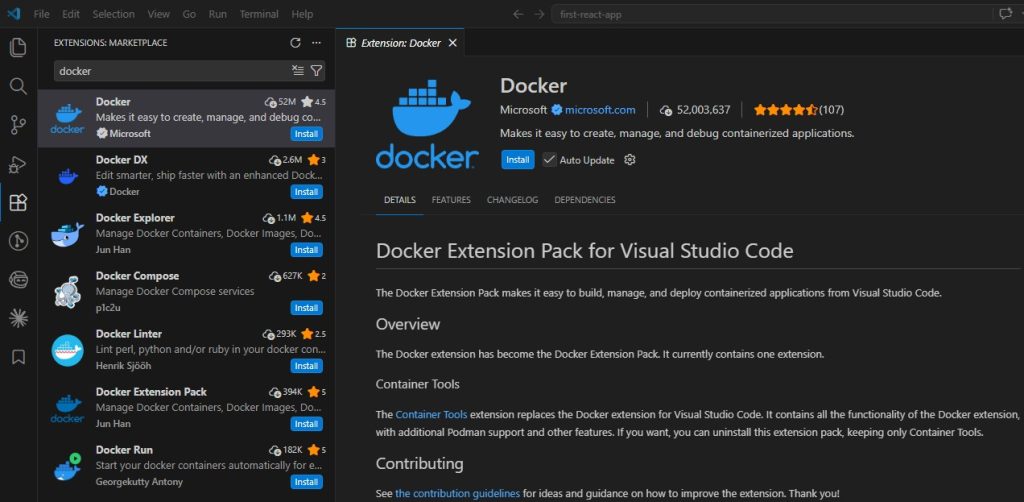
Perhaps the biggest reason for Visual Studio Code’s popularity is its massive extension ecosystem.
Whether you’re developing WordPress websites, React applications, Laravel projects, or Node.js APIs, you’ll find extensions that improve your workflow.
Some of the most popular extensions include:
These extensions allow you to build a personalised development environment without installing multiple separate tools.
Visual Studio Code supports virtually every programming language used in modern web development.
Out of the box, or with a few extensions, you can work with:
This makes it an excellent choice for full-stack developers who regularly switch between technologies.
VS Code’s IntelliSense system goes far beyond simple autocomplete.
It provides:
These features help reduce mistakes and speed up development, especially when working with large projects.

Version control is an essential part of modern software development, and VS Code includes excellent Git support without requiring extra software.
You can:
For many everyday tasks, you never need to leave the editor.
Switching constantly between your editor and a terminal slows down development.
VS Code solves this by including a fully integrated terminal that supports PowerShell, Bash, Command Prompt, Zsh, and many other shells.
You can run:
all without leaving your coding environment.
Debugging is often one of the most time-consuming parts of software development.
Visual Studio Code includes an excellent debugger that lets you:
This makes tracking down bugs significantly easier than relying on echo statements or console logging alone.
Despite its impressive feature set, VS Code remains relatively lightweight compared to many traditional IDEs.
It launches quickly, performs well on modern hardware, and handles projects ranging from small websites to large codebases.
Performance can be affected if you install a very large number of extensions, but for most developers it remains responsive even during everyday use.
No two developers work exactly the same way, and VS Code embraces this.
You can customise almost every aspect of the editor, including:
Whether you prefer a minimal interface or a feature-rich workspace, VS Code adapts to your preferences.
VS Code benefits from one of the largest developer communities in the world.
This means you’ll find:
If you encounter a problem, there’s a good chance someone else has already solved it.

One of the best things about VS Code is that it’s completely free to download and use.
Students, hobbyists, freelancers, and professional developers all have access to the same core features without paying for a licence.
This accessibility has helped make it one of the most widely adopted code editors available today.
No software is perfect, and VS Code has a few limitations.
For example:
However, for the vast majority of web development projects, these drawbacks are relatively minor compared with the flexibility and features VS Code offers.
Visual Studio Code has become the preferred code editor for millions of developers because it combines ease of use, flexibility, and powerful features in a single, free application.
Its rich extension ecosystem, intelligent code assistance, integrated debugging, built-in Git support, and highly customisable interface make it suitable for everything from simple HTML pages to large full-stack applications.
While other excellent editors certainly exist—and some developers may prefer alternatives based on their workflow – VS Code remains one of the strongest all-round choices for modern web development. If you’re looking for a free, capable, and well-supported editor, it’s an excellent place to start.